How it works
Three steps: one before class, one in class, one after. Summa Hall does the rest on its own.
01Before class
Connect your school once.
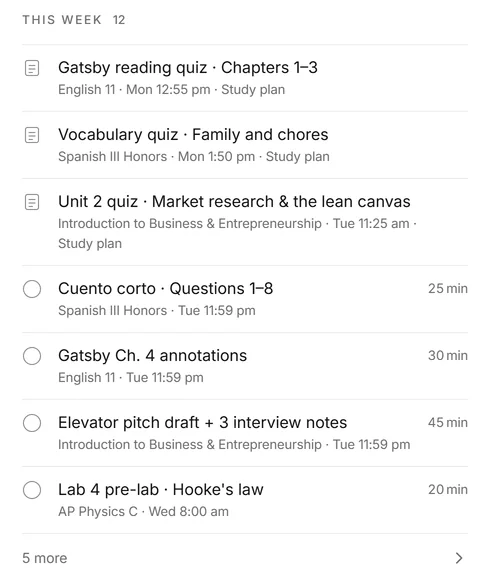
Sign in on your school's own sign-in page. Summa Hall reads your classes, your timetable and your homework from Canvas and your school portal. About 3 minutes, nothing to install.
- Homework and due dates from Canvas, in two lists: Now and Future.
- Your timetable, so each class is recorded from its bell.
02In class
Open your laptop. That's it.
Recording starts at the bell, with no button to press. Every sentence appears as your teacher says it, with a small line in your language under it.
- The class board is drawn live as the lesson goes.
- When the teacher asks a question, the answer appears on your screen, with where it came from.
- Lost for a second? One glance shows what was just said.
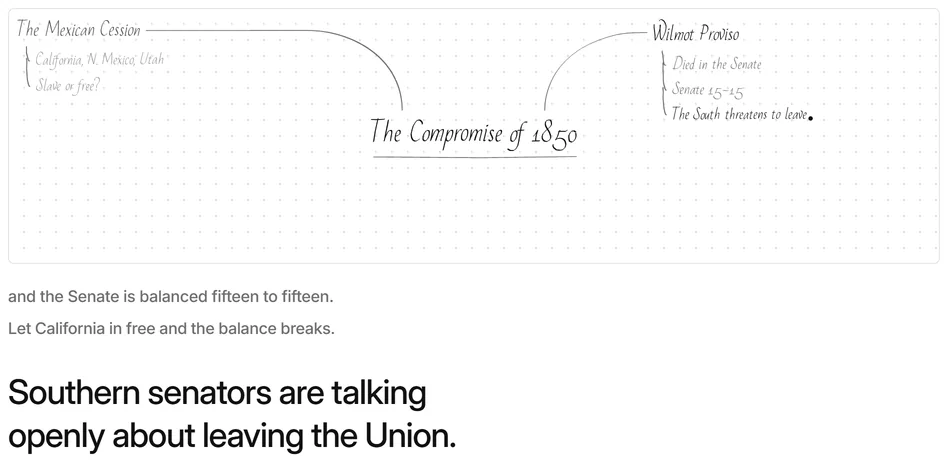
Southern senators are talking openly about leaving the Union.
Los senadores del Sur hablan abiertamente de dejar la Unión.
03After class
Ask about the class.
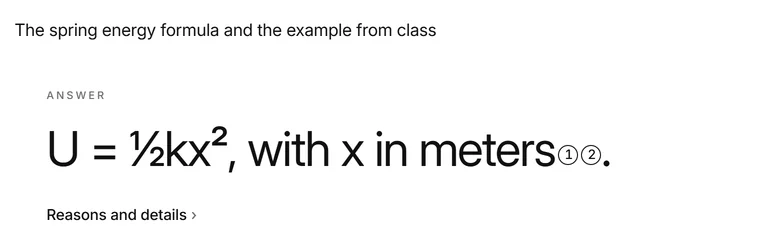
After class, Summa Hall works through the whole lesson: what was said, when, and what was on the board. Ask about any part of it and get an answer that points to the moment it came from.
- Tonight's homework is lined up with what was taught.
- Answers from your class point to the moment they came from.
Your laptop, your school's rules
It's your own laptop.
Summa Hall records your classes in your browser, on your laptop. It starts at the bell from your timetable, and you can pause it.
Your school's rules come first.
Record only where your school and your teacher allow it. You're responsible for what you record.
Who sees what.
Your recordings, captions and questions are in your account. Classmates never get your audio or your voice; at most, lines of what the teacher said are shared with your class, and you can switch that off.
Delete it all, any time.
Settings → Your data → Delete my account and data. Removal starts within 24 hours.
What it won't do
- Take a quiz, test or exam for you, even if you ask.
- Hand in, post or send anything unless you tell it to.
- Sell how you use it, or use it for ads.
Coming next
Being built now. Not in the app yet.
- A live note that thinks The lesson's big idea and its storyline, built while class is on.
- One review per course Practice cards from what your teacher actually taught, ready before the test.
- Ask that looks further Answers from your class first, then your school, then your state's learning standards.
Questions
Do I need to install anything?
No. Summa Hall runs in your web browser. Setting it up takes about 3 minutes.
Does it work with my school?
It needs Canvas, so your school has to use it. You connect on your school's own sign-in page.
Which languages can the second line be in?
Spanish, Chinese or Korean, under what the teacher said. You choose it in Settings. The app itself is in English.
Am I allowed to record my class?
Only where your school and your teacher allow it. You're responsible for what you record.
Will it take a test for me?
No. Never a quiz, test or exam, and never a timed or proctored activity, even if you ask.
How old do I need to be?
13 or older. If you're under 18, use it with a parent's or guardian's knowledge.
Can I delete my data?
Yes. Settings → Your data → Delete my account and data. Removal starts within 24 hours and usually finishes within 2 days.
Ready for your next class?
Connect your schoolOpen Summa HallAbout 3 minutes to set up · Ages 13 and up